CSV ↔ Odoo
CSV ↔ Odoo: every export button becomes a live integration.
CSV is the format nobody chose and everybody has. Your bank statement, your POS end-of-day report, your carrier's tracking export, your marketplace's order feed, your ERP's nightly dump, they all land as a flat file with commas, semicolons, or tabs between the values. zSYNC watches for that file, reads it the way it actually looks (not the way a spec says it should), and turns it into Odoo records automatically. No script, no developer standing between the export button and your data.
Trusted by 50+ Odoo companies · 500+ connected APIs · Official Odoo Partner
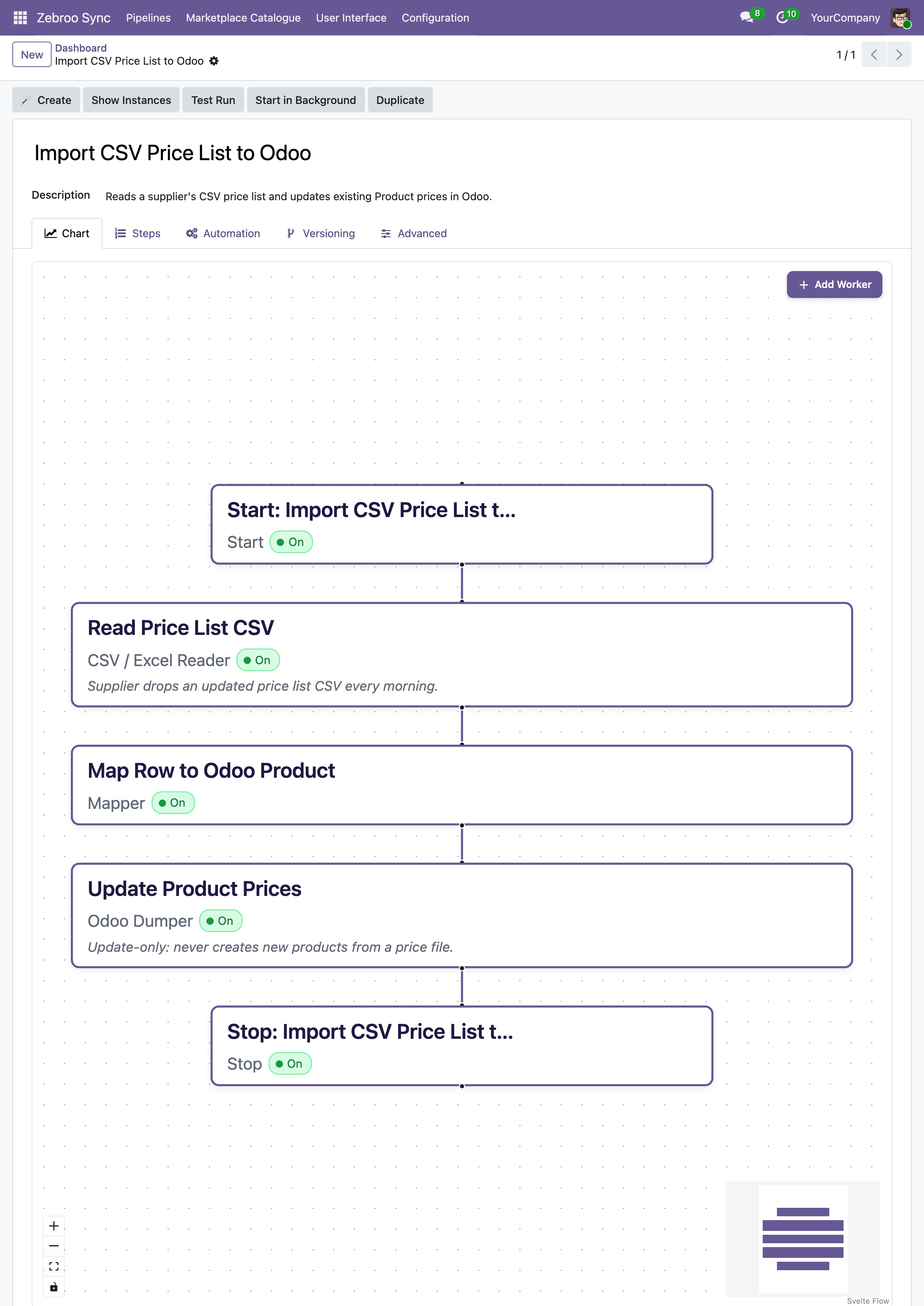
Already getting flat files from your bank, a marketplace like Amazon or Kaufland, a POS system, a logistics carrier, or a legacy ERP that only knows how to export? That's exactly what this page covers. Semicolon-separated, comma-separated, tab-separated, Windows-1252 or UTF-8, with or without a header row, dropped in an SFTP folder or emailed as an attachment: if it's a flat file with rows and columns, you're in the right place.
Sound familiar?
Every CSV export becomes a copy-paste job for someone on your team.
Someone has to open it by hand.
If importing the weekly bank statement or marketplace order file depends on a person remembering to download it, open it in Excel, and click 'Import' in Odoo, that person is now a single point of failure.
One wrong delimiter breaks the whole file.
A semicolon where a comma was expected, a stray quote, a German 1.234,56 read as an English 1,234.56, small formatting differences turn a routine import into a support ticket.
Every new sender means a new mapping, from scratch.
Your bank's columns aren't your carrier's columns, and your carrier's columns aren't your marketplace's columns. Without a reusable mapping layer, every new file format costs another round of manual matching.
Related Pages
How it works
Three steps. All inside Odoo. No code.
1
Watch
Point zSYNC at a folder, an SFTP server, or an inbox attachment. It picks up new files automatically, no one has to remember to upload anything.
2
Map
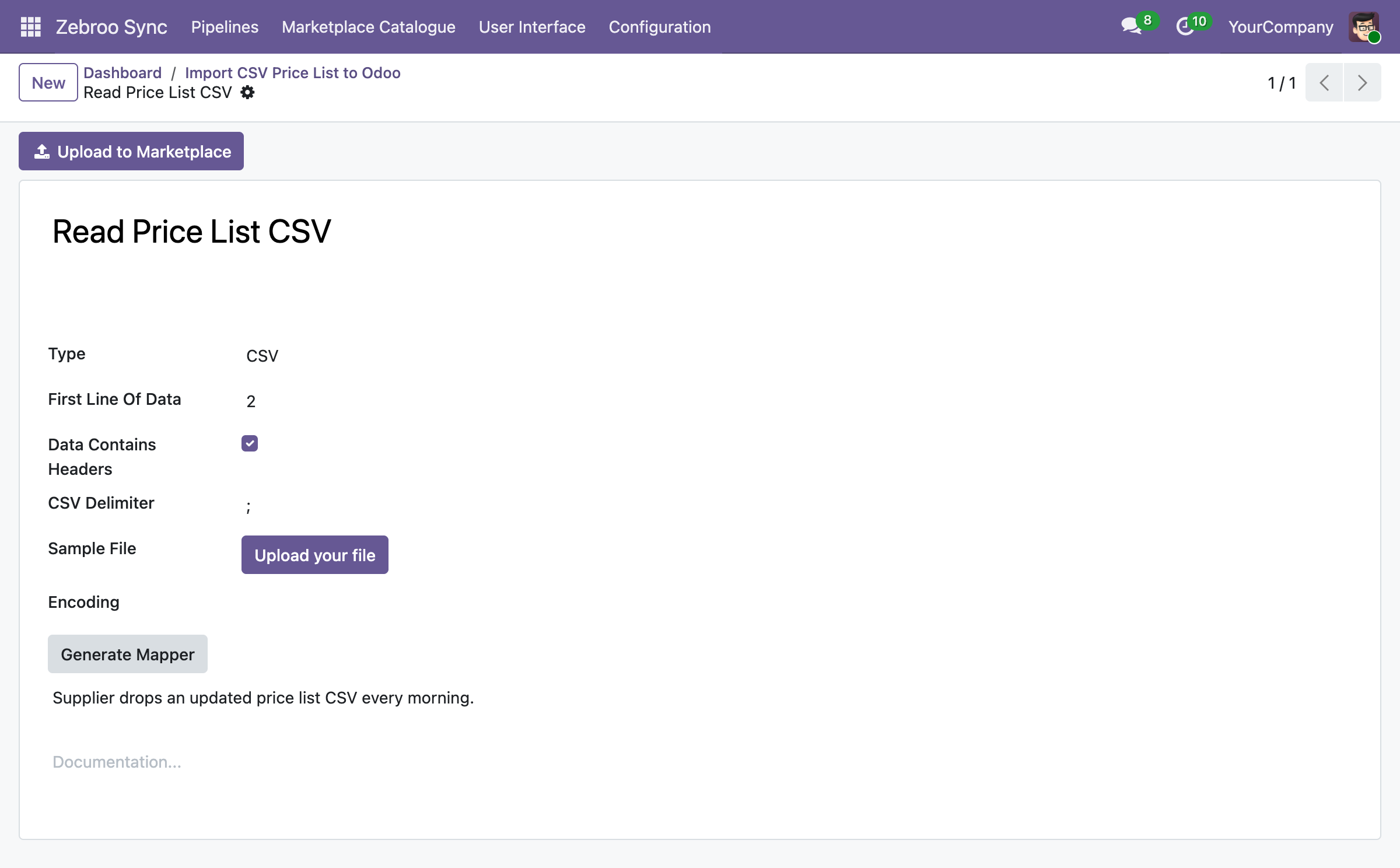
Match columns to Odoo fields in the visual flow tab, once. zSYNC handles the delimiter, the encoding, and the header row itself, and reuses the mapping for every future file of the same shape.
3
Import
Records are created or updated in Odoo, duplicates are skipped, and errors are flagged per row (not per file), so one bad line doesn't block the other four thousand.
Drop a file, and it's in Odoo within minutes. No manual import, ever again.
What gets synced
What syncs between any CSV file and Odoo
Master Data
✓ Customers/Suppliers →
✓ Product catalog ↔
✓ Price lists →
✓ Chart of accounts →
Transactions
✓ Bank statement lines →
✓ Orders →
✓ Invoices/Credit notes →
✓ Stock movements ↔
Formats & Delivery
✓ Comma, semicolon, or tab-delimited
✓ UTF-8, Windows-1252, ISO-8859-1
✓ SFTP, local folder, or email attachment
✓ With or without header row
Why teams switch to zSYNC
Measurable results, not just features.
3 → 1
Cut support costs
On one project, support effort dropped from three full-time staff to one person working 10% of their time. You own the integration, so you stop paying an agency for every adjustment.
5 Min.
Live in minutes, not weeks
A working CSV integration is up in 5 minutes. A proof of concept in minutes, complex flows in hours, not the weeks a custom integration project usually takes.
0 Outages
Survives every Odoo upgrade
Your CSV integration lives in the front end, not in custom code, so it keeps running after Odoo upgrades instead of blocking them.
No Bus Factor
No key-person risk
Any tech-savvy team member can build, own, and maintain integrations: no developer on call, no single point of failure.
Built on a proven framework
Official Odoo Partner · Trusted by 50+ companies





Hundreds
integrations built
50+
active customers
500+
connected APIs
99.9%
uptime
We handle everything. You focus on your business.
Professional setup by Zebroo, not self-service.
1
Install
We set up zSYNC in your Odoo and configure the CSV connection.
2
Configure
We build your first CSV pipeline, mapped to the exact columns your bank, carrier, or ERP actually exports.
3
Train
We hand it over so your team owns and extends it themselves.
Live in just 1–3 days.
Book a Free Demo
Pricing
One price per connection. Scale as you grow.
You pay per connection, not per user, not per record. Every plan includes the full feature set, self-hosted and GDPR-compliant.
✓Full feature set in every plan
✓No user limits
✓Always the latest version
✓Self-hosted · GDPR-compliant
The price we quote holds for the entire term of your contract.
FAQ
Frequently Asked Questions
Which Odoo versions does zSYNC support?
zSYNC runs inside your Odoo and supports the current Community and Enterprise versions. Because your integrations live in the front end (not in custom code), they keep running after Odoo upgrades instead of blocking them.
Is my data secure?
zSYNC is self-hosted in your own Odoo, so your data never leaves your environment. It's GDPR-compliant, and you control every connection, every credential, and every pipeline directly.
Does it work with any CSV file, or only ones formatted a certain way?
zSYNC reads comma-, semicolon-, and tab-delimited files, in UTF-8 or legacy encodings like Windows-1252, with or without a header row. If your bank, carrier, or marketplace can hit 'export to CSV,' zSYNC can turn that file into Odoo records.
What happens if a sync fails? Is there downtime?
Failures don't bring down your system. zSYNC runs on queued jobs, so integrations don't block each other. Every run is monitored, so you can retry a failed run, even add a field, and reprocess the exact same data.
Stop paying someone to open a spreadsheet every morning.
Book a Free DemoNo commitment. 30-minute session. See it live.