XML ↔ Odoo
XML ↔ Odoo: turn schema-driven XML (SOAP, EDI, e-invoices, legacy exports) into clean Odoo records automatically.
XML isn't going away. Tax authorities mandate it for e-invoicing, EDI networks run on it, legacy ERPs export nothing else, and a large share of enterprise APIs still speak SOAP. zSYNC reads XSD schemas, resolves namespaces, and walks nested elements and attributes automatically, so a 40-KB invoice payload with three namespace prefixes maps to Odoo fields the same way a flat CSV would. No custom parser, no XPath scripts to maintain.
Trusted by 50+ Odoo companies · 500+ connected APIs · Official Odoo Partner
Already sending e-invoices through XRechnung, ZUGFeRD, or Peppol BIS? Talking to a partner's SOAP web service? Pulling EDI documents wrapped in XML from a logistics network, ingesting an RSS/Atom feed, or exporting IDocs from an AS/400 or SAP system that only speaks XML? zSYNC reads the schema, resolves the namespaces, and maps the elements. The rule is simple: if it's structured XML with a schema behind it, you're in the right place.
Sound familiar?
Every schema change breaks the integration you built last year.
One namespace prefix, and everything stops.
A supplier bumps their WSDL, a government portal revises its XSD, and a field that used to map cleanly now sits under a different namespace. Someone has to open the payload, find the change, and patch code before invoices flow again.
Compliance formats don't wait for your dev queue.
E-invoicing mandates and EDI specs come with deadlines, not requests. If your XRechnung or Peppol mapping lives in a script one contractor wrote, you're exposed the day it needs to change.
Legacy exports are a black box until someone opens them.
That nightly XML dump from your old ERP or AS/400 has no documentation and exactly one person who understands it. When they leave, the integration becomes a mystery nobody wants to touch.
Related Pages
How it works
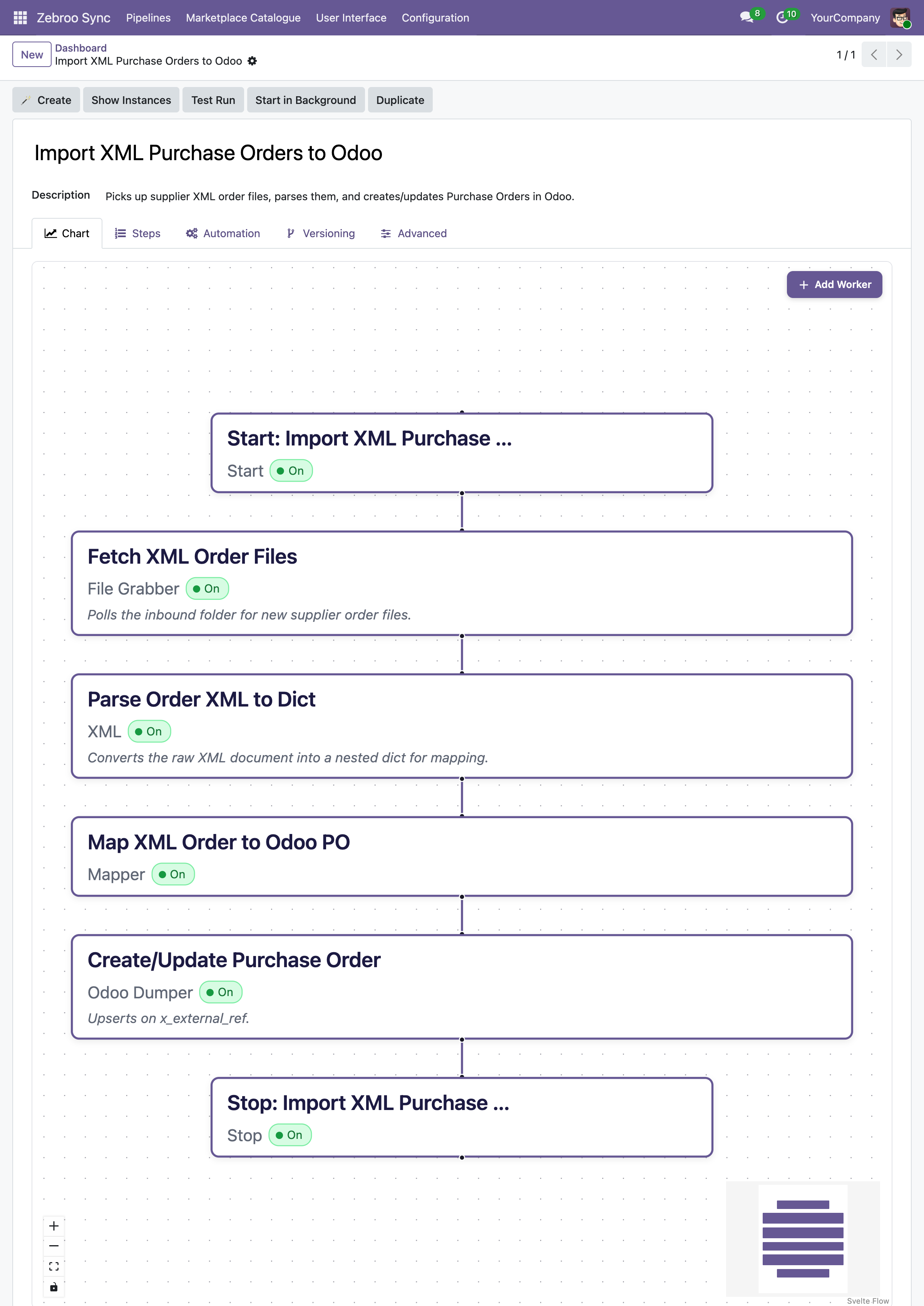
Three steps. All inside Odoo. No code.
1
Parse
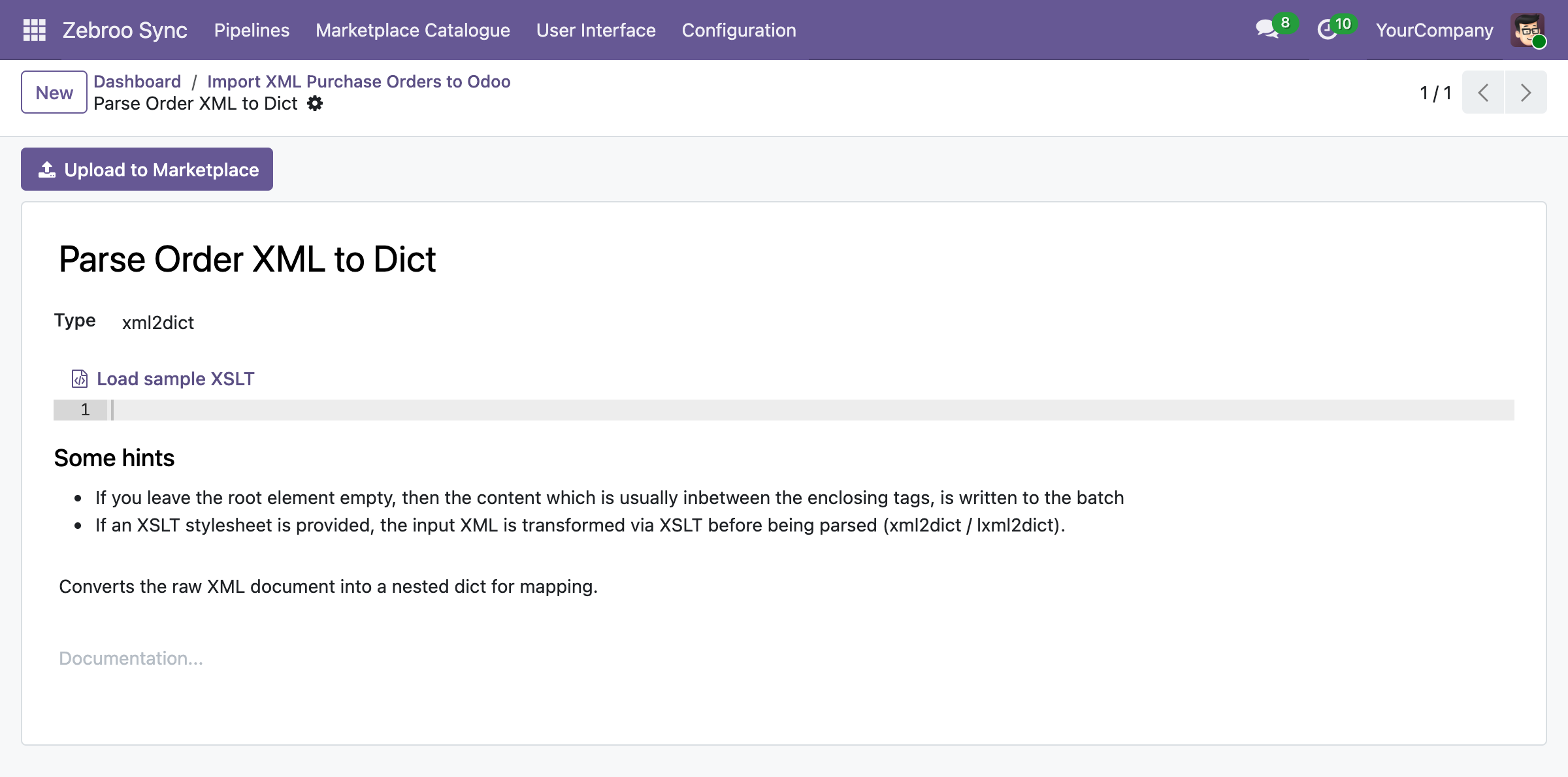
zSYNC ingests any XML payload (SOAP envelope, EDI document, e-invoice, or feed) and reads its XSD or DTD automatically, resolving namespaces and nested structures without custom code.
2
Map
Ordnen Sie XML-Elemente und -Attribute im visuellen Flow-Tab Odoo-Feldern zu. Wiederholende Knoten, verschachtelte Strukturen und namespace-qualifizierte Tags werden visuell verarbeitet, Änderungen wirken sofort, ganz ohne erneutes Deployment.
3
Deliver
Write parsed records into Odoo, or generate schema-valid XML (SOAP requests, e-invoices, EDI responses) straight from Odoo data. Every run is monitored, and any failure can be retried with one click.
Runs on your schedule or on arrival. No manual downloads. No hand-written XSLT.
What gets synced
What syncs between any XML source and Odoo
Master Data
✓ Customers/Partners →
✓ Products/Catalog ↔
✓ Price lists →
✓ Any XML resource ↔
Transactions
✓ Orders →
✓ E-invoices ↔
✓ EDI documents ↔
✓ Shipments/Tracking ↔
Authentication & Formats
✓ WS-Security & SOAP headers
✓ XSD/DTD schema validation
✓ Namespace-qualified XML
✓ XRechnung, ZUGFeRD, Peppol, EDIFACT-in-XML
Why teams switch to zSYNC
Measurable results, not just features.
3 → 1
Cut support costs
On one project, support effort dropped from three full-time staff to one person working 10% of their time. You own the integration, so you stop paying an agency for every adjustment.
5 Min.
Live in minutes, not weeks
A working XML integration is up in 5 minutes. A proof of concept in minutes, complex flows in hours, not the weeks a custom integration project usually takes.
0 Outages
Survives every Odoo upgrade
Your XML integration lives in the front end, not in custom code, so it keeps running after Odoo upgrades instead of blocking them.
No Bus Factor
No key-person risk
Any tech-savvy team member can build, own, and maintain integrations: no developer on call, no single point of failure.
Built on a proven framework
Official Odoo Partner · Trusted by 50+ companies
Hundreds
integrations built
50+
active customers
500+
connected APIs
99.9%
uptime
We handle everything. You focus on your business.
Professional setup by Zebroo, not self-service.
1
Install
We set up zSYNC in your Odoo and configure the XML connection.
2
Configure
We build your first XML pipeline, tailored to your schema, namespaces, and endpoints.
3
Train
We hand it over so your team owns and extends it themselves.
Live in just 1–3 days.
Book a Free Demo
Pricing
One price per connection. Scale as you grow.
You pay per connection, not per user, not per record. Every plan includes the full feature set, self-hosted and GDPR-compliant.
✓Full feature set in every plan
✓No user limits
✓Always the latest version
✓Self-hosted · GDPR-compliant
The price we quote holds for the entire term of your contract.
FAQ
Frequently Asked Questions
Which Odoo versions does zSYNC support?
zSYNC runs inside your Odoo and supports the current Community and Enterprise versions. Because your integrations live in the front end (not in custom code), they keep running after Odoo upgrades instead of blocking them.
Is my data secure?
zSYNC is self-hosted in your own Odoo, so your data never leaves your environment. It's GDPR-compliant, and you control every connection, every credential, and every pipeline directly.
Can it connect to any XML format: SOAP, EDI, e-invoicing, feeds?
Yes, zSYNC parses XSD and DTD schemas, resolves namespaces, and handles SOAP envelopes with WS-Security headers, EDI-in-XML, e-invoicing standards like XRechnung and Peppol, RSS/Atom feeds, and legacy ERP exports. If it's structured XML with a schema, zSYNC can read it and write it.
What happens if a sync fails? Is there downtime?
Failures don't bring down your system. zSYNC runs on queued jobs, so integrations don't block each other. Every run is monitored, so you can retry a failed run, even add a field, and reprocess the exact same data.
Own your XML integrations: don't leave them locked in someone's parser script.
Book a Free DemoNo commitment. 30-minute session. See it live.