JSON ↔ Odoo
JSON ↔ Odoo: turn any nested payload into structured records, without writing a parser.
JSON doesn't wait for a data architect to bless its shape. It arrives nested three levels deep from a webhook, flat from a CSV-to-JSON export, or with arrays of arrays from a legacy system's dump. zSYNC reads the structure as it actually is, not as a diagram says it should be, and maps every object, array, and null straight into Odoo fields. No parser code, no brittle regex, no rewritten integration every time a vendor changes their schema.
Trusted by 50+ Odoo companies · 500+ connected APIs · Official Odoo Partner
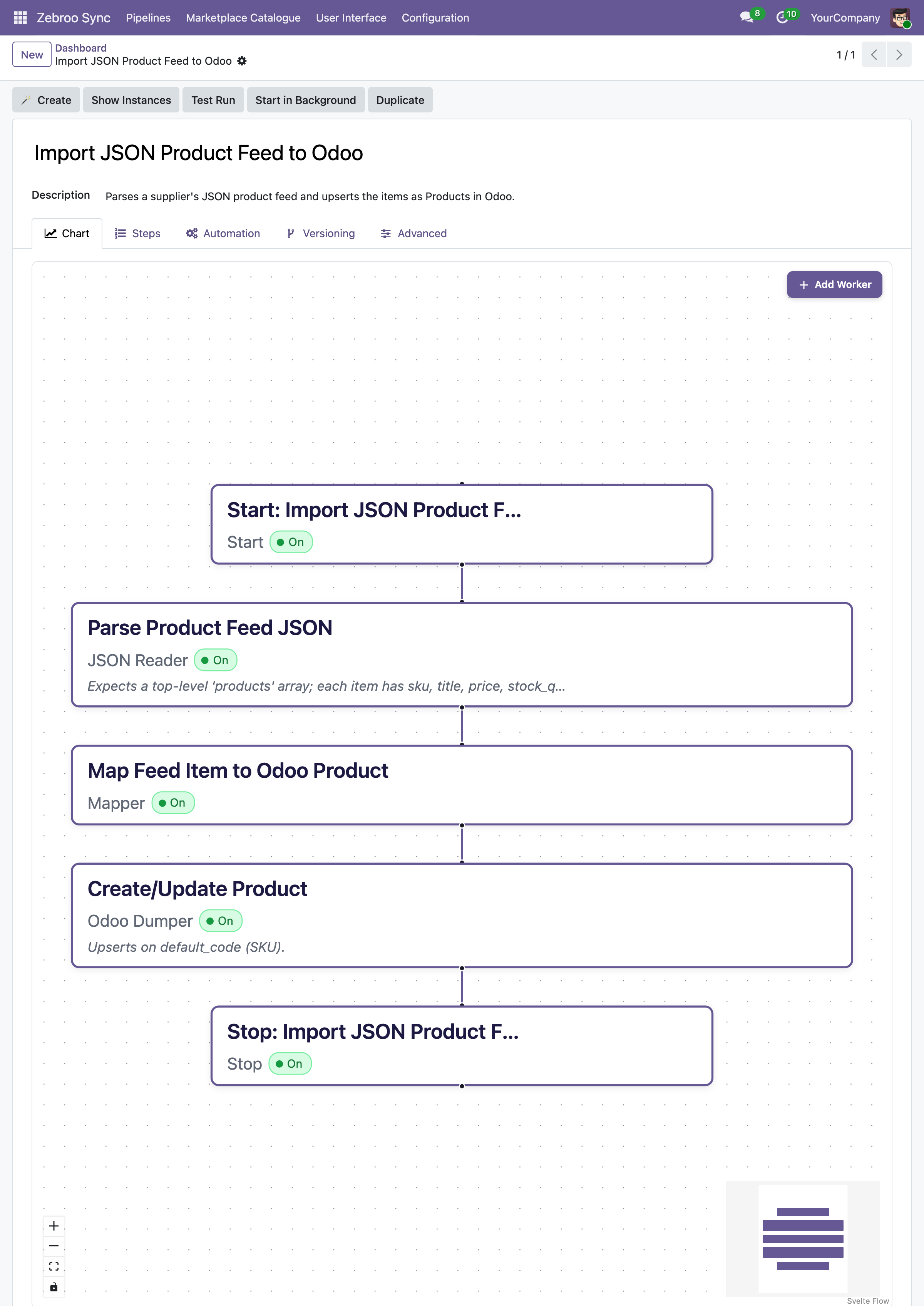
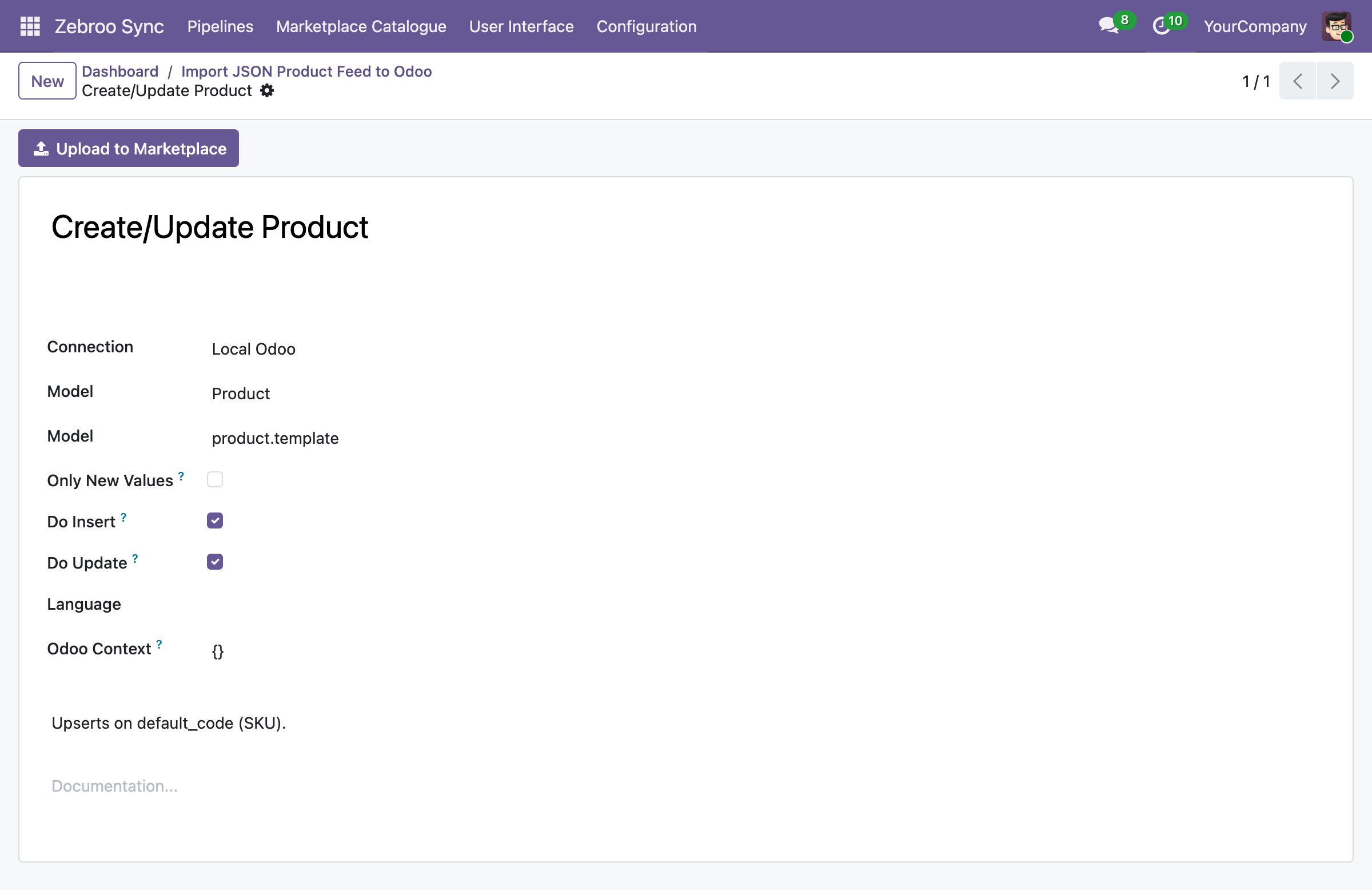
JSON shows up everywhere: a webhook payload from your e-commerce platform, a nightly export dropped into an S3 bucket or FTP folder, a message on a queue like RabbitMQ or SQS, a config file driving a partner integration, or the response body of any REST API. zSYNC doesn't care where the JSON came from or how deep it's nested, if you can hand it a JSON payload, you're in the right place.
Sound familiar?
Nested JSON turns into nested technical debt.
One level deep isn't enough.
Real payloads nest objects inside arrays inside objects. Most integration tools flatten early and lose data, or need a developer to write custom traversal code for every new field.
Schemas drift without warning.
A vendor adds a field, renames a key, or turns a single object into an array. Hardcoded parsers break silently, and you find out when a record fails to import, or worse, imports wrong.
Every source speaks its own dialect.
The file drop, the queue message, and the API response all carry JSON, but each shapes it differently. That's three integration projects instead of one, unless your mapping layer doesn't care about the source.

How it works
Three steps. All inside Odoo. No code.
1
Receive
Pull JSON from an HTTP/S endpoint, a file drop on S3 or FTP, or a message queue: zSYNC ingests the payload as-is, however deep it nests.
2
Map
Point and click through nested objects and arrays in the visual flow tab. Flatten, loop, or transform values without writing a single line of parsing code.
3
Write
zSYNC writes structured records into Odoo, or serializes Odoo data back into JSON for the next system in line. Every run is logged, and any failure can be retried with one click.
Nesting three levels deep or ten. Same visual mapper, no extra code.
What gets synced
What syncs between any JSON source and Odoo
Master Data
✓ Customers/Contacts →
✓ Products/Catalog ↔
✓ Price lists →
✓ Any nested JSON object ↔
Transactions
✓ Orders →
✓ Invoices →
✓ Shipment events (arrays) ↔
✓ Webhook payloads →
Sources & Formats
✓ REST/HTTP API responses
✓ File drops (S3, FTP, SFTP)
✓ Message queues (SQS, RabbitMQ, Kafka)
✓ Nested objects, arrays, and nulls: any depth
Why teams switch to zSYNC
Measurable results, not just features.
3 → 1
Cut support costs
On one project, support effort dropped from three full-time staff to one person working 10% of their time. You own the integration, so you stop paying an agency for every adjustment.
5 Min.
Live in minutes, not weeks
A working JSON integration is up in 5 minutes. A proof of concept in minutes, complex flows in hours, not the weeks a custom integration project usually takes.
0 Outages
Survives every Odoo upgrade
Your JSON integration lives in the front end, not in custom code, so it keeps running after Odoo upgrades instead of blocking them.
No Bus Factor
No key-person risk
Any tech-savvy team member can build, own, and maintain integrations: no developer on call, no single point of failure.
Built on a proven framework
Official Odoo Partner · Trusted by 50+ companies


Hundreds
integrations built
50+
active customers
500+
connected APIs
99.9%
uptime
We handle everything. You focus on your business.
Professional setup by Zebroo, not self-service.
1
Install
We set up zSYNC in your Odoo and configure the JSON connection.
2
Configure
We build your first JSON pipeline, tailored to your data and schema.
3
Train
We hand it over so your team owns and extends it themselves.
Live in just 1–3 days.
Book a Free Demo
Pricing
One price per connection. Scale as you grow.
You pay per connection, not per user, not per record. Every plan includes the full feature set, self-hosted and GDPR-compliant.
✓Full feature set in every plan
✓No user limits
✓Always the latest version
✓Self-hosted · GDPR-compliant
The price we quote holds for the entire term of your contract.
FAQ
Frequently Asked Questions
Which Odoo versions does zSYNC support?
zSYNC runs inside your Odoo and supports the current Community and Enterprise versions. Because your integrations live in the front end (not in custom code), they keep running after Odoo upgrades instead of blocking them.
Is my data secure?
zSYNC is self-hosted in your own Odoo, so your data never leaves your environment. It's GDPR-compliant, and you control every connection, every credential, and every pipeline directly.
Can zSYNC handle deeply nested or irregular JSON?
Yes, zSYNC's visual mapper walks arbitrarily nested objects and arrays without generating custom code for each shape. Optional fields, nulls, and arrays that sometimes contain one item and sometimes a hundred are all handled the same way, whether the JSON arrives over HTTP, from a file drop, or off a message queue.
What happens if a sync fails? Is there downtime?
Failures don't bring down your system. zSYNC runs on queued jobs, so integrations don't block each other. Every run is monitored, so you can retry a failed run, even add a field, and reprocess the exact same data.
Own your JSON mappings: don't rebuild them every time a schema changes.
Book a Free DemoNo commitment. 30-minute session. See it live.