SAP ↔ Odoo
SAP ↔ Odoo: Master data, always in sync.
Stop maintaining dual master data by hand. zSYNC connects SAP and Odoo inside your Odoo instance — no middleware, no bespoke code, no SAP consultant on standby.
Trusted by 50+ Odoo businesses · 500+ APIs connected · Official Odoo Partner
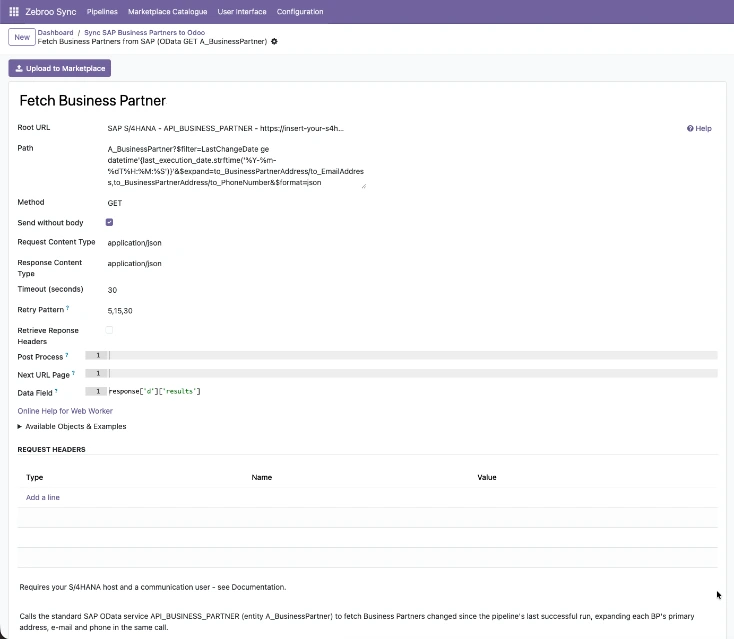
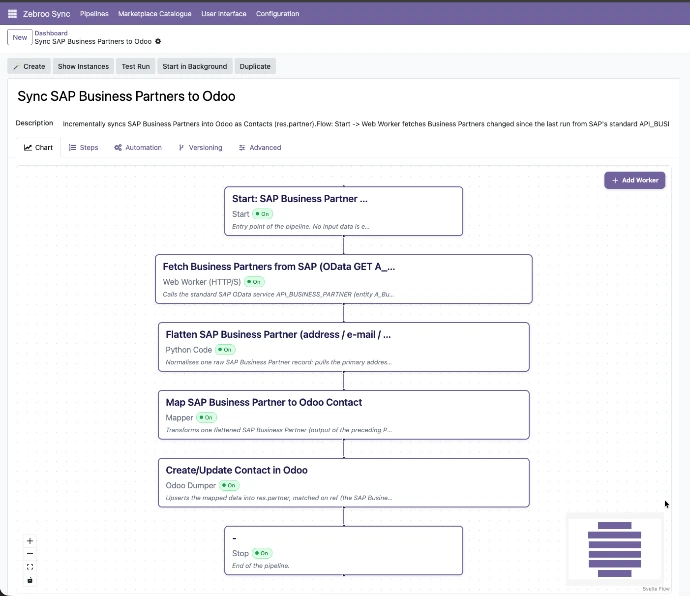
Screenshot placeholder
Add your zSYNC SAP pipeline screenshot here
Sound familiar?
SAP and Odoo live in silos. Your team pays the price.
Who owns your interfaces?
When your SAP integration lives in one developer’s head or a consultancy’s codebase, a sick day or contract end becomes a business crisis.
A typo shouldn’t mean downtime.
Fixing your SAP sync means ABAP editor → transport → deploy — and a SAP Basis consultant on standby every single time.
Master data drifts out of sync.
Customers, vendors, and materials live in SAP and Odoo — updated in one, forgotten in the other. Reconciliation eats hours every month.
How It Works
Three steps. All inside Odoo. No code.
1
Grab
Pull master data, orders, or stock from SAP via RFC/BAPI or REST. zSYNC fetches only what changed since the last run — delta sync, no full re-imports.
2
Map
Match SAP fields to Odoo fields on the visual Flow Tab. Add transforms, filters, and routing rules — edit live, no ABAP, no transport.
3
Dump
Write records into Odoo (or back to SAP). Every run monitored — any failure replayed with one click, no SAP consultant required.
Runs automatically. No manual exports. No copy-paste.
Screenshot placeholder
Add your zSYNC Flow Tab / pipeline canvas screenshot here
What Gets Synced
What gets synced between SAP and Odoo
Master Data
✓ Customers ↔
✓ Vendors ↔
✓ Materials / Products ↔
✓ BOMs →
Orders & Finance
✓ Purchase orders →
✓ Sales orders →
✓ Invoices →
✓ Cost centers →
Stock & Logistics
✓ Stock levels ↔
✓ Goods receipts →
✓ Delivery notes →
→ one-way ↔ two-way
Don’t see your object? It’s a pipeline away.
Why teams move to zSYNC
Measurable outcomes, not just features.
3 → 1
Cut support costs
In one project, support dropped from three full-time people to one person at 10% of their time. You own the fix, so you stop paying for one.
5 min
Live in minutes, not months
A working SAP interface stands up in 5 minutes. PoC in minutes, complex flows in hours — not the weeks a classic SAP project takes.
0 breaks
Survives every Odoo upgrade
Your SAP integration lives in the front end, not in code, so it keeps running through migrations instead of blocking them.
No bus factor
No key-person risk
Any IT-savvy user can build, own, and maintain interfaces — no ABAP, no SAP Basis, no single point of failure.
Built on a deeply proven framework
Official Odoo Partner · Trusted by 50+ businesses
Customer logos placeholder · Add logo images here
“In one project, we maintain 140 interfaces with about 20% of one person’s time — and a bug fixed for one customer is fixed for everyone.”
Hundreds
interfaces built
50+
active customers
500+
APIs connected
99.9%
uptime
We handle everything. You focus on your business.
Professional setup by Zebroo — not self-serve.
1
Install
We set up zSYNC in your Odoo. No self-serve guesswork.
2
Configure
We build your first SAP pipeline, mapped to your data model.
3
Train
We hand it over so your team can own and extend it.
Live in as little as 1–3 days.
Book a Free Demo
Pricing
One price per connection. Scale as you grow.
You pay per connection — not per user, not per record. Every plan includes the full feature set, self-hosted and DSGVO-compliant.
✓Full functionality on every plan
✓No user limits
✓Always the latest version
✓Self-hosted · DSGVO-compliant
The price we quote holds — forever.
FAQ
Frequently asked questions
Which Odoo versions does zSYNC support?
zSYNC runs inside your Odoo and supports current Community and Enterprise versions. Because your interfaces live in the front end — not in custom code — they keep running through Odoo upgrades instead of blocking them.
Is my data secure?
zSYNC is self-hosted in your own Odoo, so your data never leaves your environment. It’s DSGVO-compliant, and you control every connection, credential, and pipeline directly.
Does it need ABAP or SAP Basis access?
No ABAP required. zSYNC connects to SAP via RFC/BAPI or REST — standard interfaces any SAP system already exposes. Zebroo handles the initial connection setup; after that, you manage pipelines entirely inside Odoo.
What happens if a sync fails — any downtime?
Failures don’t take your system down. zSYNC runs on queue jobs so interfaces never block each other. Every run is monitored — you can replay a failed run, even add a field and re-run the exact same data.
Own your SAP integration — don’t rent it.
Book a Free Demo
No commitment. 30-minute session. See it live.